Tools
Sonar, Porthole and Skiff: A Free Sysadmin Toolkit for Rocky Linux
November 14, 2026 · Mike Anderson · 4 min read
If you’ve moved an office or a team from Windows to Rocky Linux, you know the feeling. The servers are fine. It’s the little desktop tools you reached for every day that you miss: the IP scanner, the tabbed SSH manager, the drag-and-drop file transfer window.
So I built them. Today I’m releasing three free, open-source apps for Rocky Linux and other EL 9 / EL 10 desktops. Each one is a native RPM that installs with dnf and pulls its dependencies from the stock Rocky repos.
The toolkit
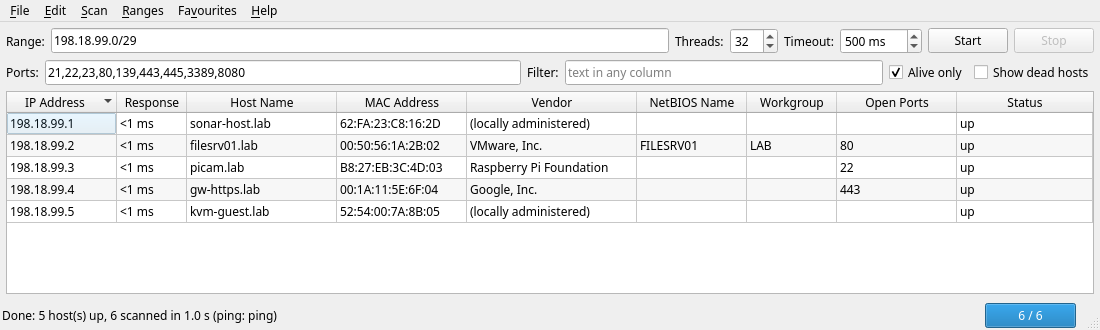
Sonar finds the hosts. It’s a multithreaded network scanner modeled on the classic Windows IP scanners. Give it a range like 192.168.1.0/24 and it sweeps it in parallel, showing each live host’s name, MAC address and vendor, NetBIOS name and open ports. Export the results to CSV, TXT, HTML or XML for your documentation. No root required.
Porthole gives you a shell. It’s a tabbed SSH session manager with a folder tree of saved hosts, broadcast input to many sessions at once, and saved passwords kept in your keychain or an encrypted vault. Under the hood every tab is your normal OpenSSH client, so your keys, ~/.ssh/config and jump hosts just work. (If you used MultiSSH Manager, this is its new name. A dnf upgrade carries your sessions over.)
Skiff moves the files. It’s a dual-pane SFTP client in the WinSCP style: local files on the left, the server on the right, a transfer queue at the bottom, and the same F-key shortcuts. Saved sites and passwords, key logins, drag-and-drop uploads.
They work together
The three are designed as a set. Scan a subnet in Sonar, right-click a host, and open it in Porthole for a shell or in Skiff for file transfer. You set where each app lives in Sonar’s master config file, /etc/sonar/sonar.conf. Porthole also takes porthole --connect user@host from the command line.
Next up: Porthole 3.1.0 adds Open in Skiff from the host menu, passing your saved credentials securely, and Skiff 1.3.0 adds login prompts and a command-line option of its own.
Install one, or all three
Each app has its own RPM, so install only what you need. On Rocky Linux 9:
sudo dnf install https://github.com/mike0615/sonar/releases/download/v1.0.0/sonar-1.0.0-1.el9.noarch.rpm
sudo dnf install https://github.com/mike0615/porthole/releases/download/v3.0.0/porthole-3.0.0-1.el9.noarch.rpm
sudo dnf install https://github.com/mike0615/skiff/releases/download/v1.2.0/skiff-1.2.0-1.el9.noarch.rpm
On Rocky Linux 10, use the el10 RPMs. Newer versions are always on each project’s latest-release page: Sonar, Porthole, Skiff.
Coming soon: a single bundle package that installs all three with one command, plus a small dnf repository so dnf upgrade keeps them current.
Free and open
All three are MIT-licensed, so you can use them at work, at home, or at your customers’ sites. The source, help docs and issue trackers are on GitHub. If you run into something, or want a feature, open an issue there or get in touch.
These came straight out of the work we do every day. If your business is standardizing on Rocky Linux and wants help with the move, the tooling or the network underneath it, that’s what we do.