Code Share
Porthole SSH Manager
Free tabbed multi-session SSH manager for Rocky Linux 9 and 10 with a session tree, saved passwords and broadcast input. Formerly MultiSSH Manager.

Description
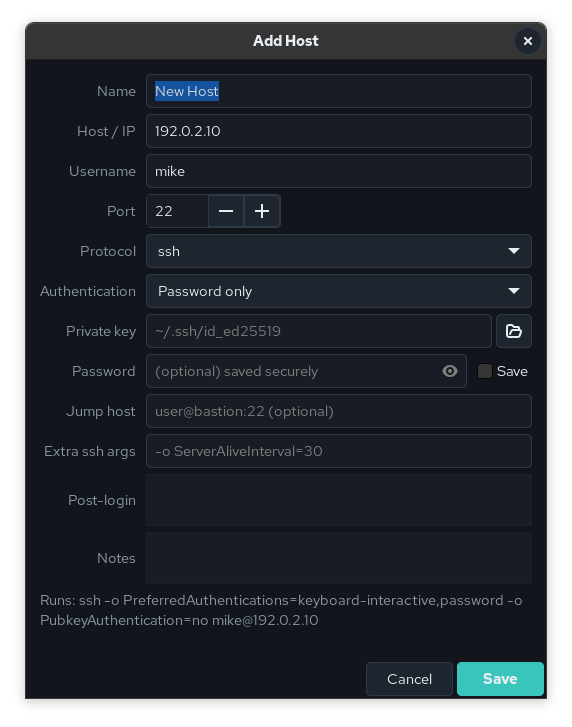
Porthole is a native Linux SSH session manager in the spirit of Multi PuTTY Manager on Windows. Saved hosts sit in a folder tree on the left; real terminal sessions open as tabs on the right. Every tab runs your system’s own ssh inside a VTE terminal (the same engine GNOME Terminal uses), so ~/.ssh/config, ssh-agent, keys, jump hosts and known_hosts all behave exactly as they do in a normal shell.
Porthole is the “get a shell” part of the Anderson Computer sysadmin toolkit, next to Sonar and Skiff. It was previously released as MultiSSH Manager; upgrading with dnf replaces the old package and carries your sessions, settings and saved passwords over.
Features
- Folder tree of saved hosts with search, drag-and-drop and sorting; connect a whole folder at once
- Broadcast a command to every ticked tab, or mirror keystrokes live
- Reconnect in place when a session drops
- Saved passwords in the login keychain or an AES-256 encrypted vault, passed to ssh privately, never typed into the terminal or logged
- Prompts for a missing username or password at connect time
- Jump hosts, per-host key / agent / password auth, post-login commands
- Import from MultiPuTTY / PuTTY Connection Manager XML and
~/.ssh/config porthole --connect user@hostto open a session straight from the command line or from Sonar- Built-in Help and About pages
Install
Pick the RPM that matches your release. The current version is listed on the latest release page. All dependencies are in the stock BaseOS / AppStream repos.
# Rocky Linux / EL 9
sudo dnf install https://github.com/mike0615/porthole/releases/download/v3.0.0/porthole-3.0.0-1.el9.noarch.rpm

# Rocky Linux / EL 10
sudo dnf install https://github.com/mike0615/porthole/releases/download/v3.0.0/porthole-3.0.0-1.el10.noarch.rpm
porthole                              # open your saved sessions
porthole --connect admin@10.0.0.5     # open a tab and connect now
Coming next
Porthole 3.1.0 adds Open in Skiff to the host right-click menu, handing the saved credentials to Skiff securely so you can jump from a shell to a file transfer in one click.
Links
- Source and docs: github.com/mike0615/porthole
- Downloads: latest release
- License: MIT, free to use