Code Share
Sonar Network Scanner
Free multithreaded IP scanner for Rocky Linux 9 and 10 that finds hosts, MAC vendors, NetBIOS names and open ports. Packaged as RPMs.

Description
Sonar is a multithreaded network scanner modeled on the classic Windows IP scanners. Type a range, press Start, and Sonar checks every address in parallel. For each live host it shows the response time, host name, MAC address and vendor, NetBIOS name and workgroup, and open TCP ports. It runs as a normal user: no root needed.
Sonar is the “find the hosts” part of the Anderson Computer sysadmin toolkit. Right-click any host to open it in Porthole for a shell or Skiff for file transfer.
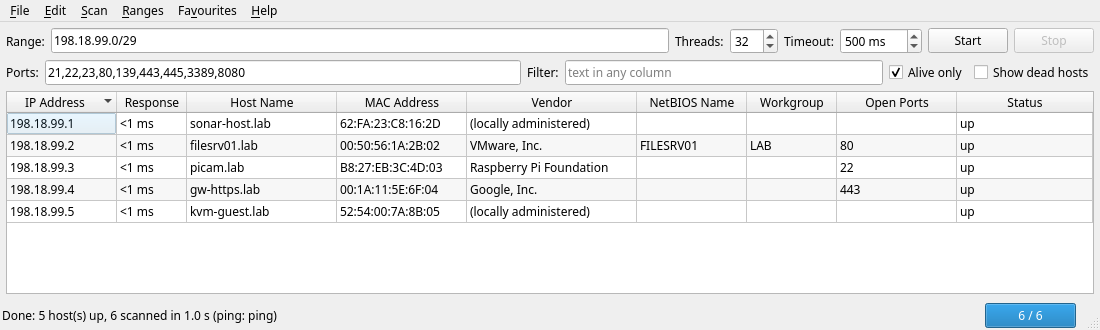
Features
- Ranges like
10.0.0.1-254,10.0.0.0/24,10.0.0.*or comma lists - Discovery by ICMP ping, falling back to a TCP connect probe
- Configurable threads (1-512) and timeout, with Start / Stop and a progress bar
- Reverse DNS, MAC address with vendor lookup, NetBIOS name and workgroup
- Port scan of your own TCP port list on every live host
- Sort any column (IPs sort numerically), filter box, “Alive only” toggle
- Export to CSV, TXT, HTML or XML
- Saved ranges and favourite hosts
- Right-click: copy, ping, open in a browser, Open in Skiff, Open in Porthole
- Built-in Help (
F1) and About pages
Install
Pick the RPM that matches your release. The current version is listed on the latest release page. Everything it needs is in the stock BaseOS / AppStream repos.
# Rocky Linux / EL 9
sudo dnf install https://github.com/mike0615/sonar/releases/download/v1.0.0/sonar-1.0.0-1.el9.noarch.rpm

# Rocky Linux / EL 10
sudo dnf install https://github.com/mike0615/sonar/releases/download/v1.0.0/sonar-1.0.0-1.el10.noarch.rpm
Then start Sonar from the applications menu, or run sonar --range 192.168.1.0/24.
Configuration
System defaults live in /etc/sonar/sonar.conf. Each user can override any key in ~/.config/sonar/sonar.conf or from Edit > Preferences. The [launchers] section tells Sonar where the companion apps are installed:
[launchers]
skiff_path = /usr/bin/skiff
multissh_path = /usr/bin/porthole
Links
- Source and docs: github.com/mike0615/sonar
- Downloads: latest release
- License: MIT, free to use
- Only scan networks you own or are authorized to test.